This covers the characteristics of each index type and how to read execution plans.
Learning materials and references
Illustrated Guide to How SQL Server Works
Chapter 5, “Row-store tables,” has a detailed explanation of indexes and is recommended.
A Thorough Guide to Database Design (達人に学ぶDB設計 徹底指南章)
I wrote notes and a partial introduction after reading A Thorough Guide to Database Design — please take a look.
Book notes: A Thorough Guide to Database Design
For video, Peacock Anderson’s Udemy course is easy to follow because you can learn it as a hands-on.

The article below is by a senior engineer I work with. It covers more than indexes and I learned a lot from it. My article leans toward explanations on a Mac; if you want a Windows walkthrough or another angle, please take a look.
Installing SQL Server
Please refer to the links below.
Windows
DB server: SQL Server
DB client tool: SQL Server Management Studio (Japanese edition)
Mac
DB server: Create a SQL Server container on Docker
DB client tool: Azure Data Studio
Overview
Assumptions
The walkthrough assumes a table and data like the following as test data. If the data volume is small, an index may not be used and the work can become a full-table search, so you need a fair amount of data.
-- ---------------------
-- 取引
-- ---------------------
CREATE TABLE blog.sales (
    sales_id INT NOT NULL
    , amount INT NOT NULL
    , transaction_date DATE NOT NULL
    , status VARCHAR(20) NOT NULL
    , cancel_flg BIT NOT NULL
    , shop_id INT NOT NULL
    , user_id INT NOT NULL
    , PRIMARY KEY(sales_id)
    , FOREIGN KEY(user_id) REFERENCES blog.my_user(user_id) -- ユーザテーブルがある前提
    , FOREIGN KEY(shop_id) REFERENCES blog.shop(shop_id) -- 店舗テーブルがある前提
)
・Sales (sales) data
There are 50 million rows. Transaction dates fall between 2022-01-01 and 2022-12-31, and 99% or more of the statuses are “success.”
※ Status: two kinds, success and failure
Preparing tens of millions of rows by hand while writing INSERT statements is a lot of work. The BCP command is effective for preparing large data; please also see the following article.
SQL Server: Bulk-import large data with the BCP command
How to display an execution plan
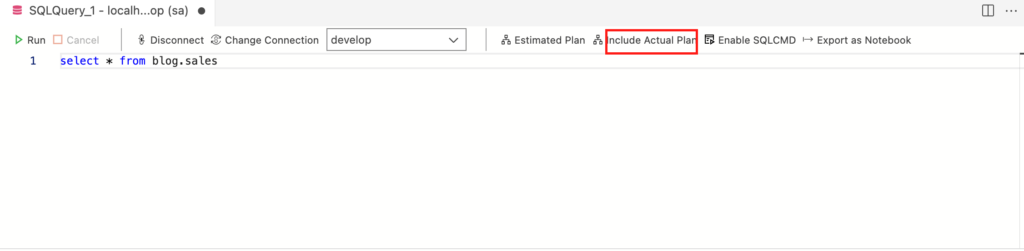
An execution plan shows how SQL Server goes to get the data. The following is how to see it in Azure Data Studio. Click “Include Actual Plan” so it becomes “Exclued Actual Plan,” then click “Estimated Plan” and the execution plan is shown graphically in the preview. If you have a Japanese-language plugin installed, the wording is “説明.”
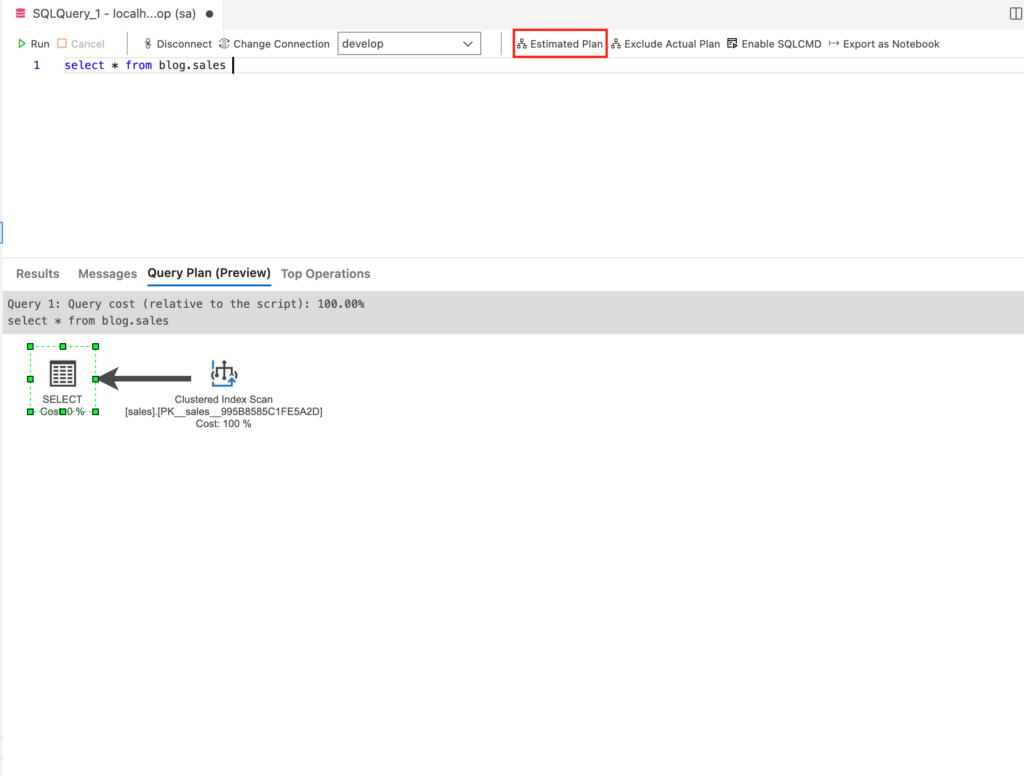
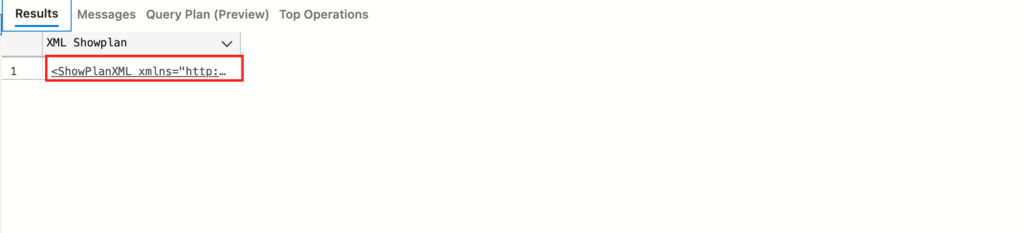
The preview is a graphical view of the XML that was obtained, so you can also save the XML. If you save it with the extension .sqlplan, Azure Data Studio will preview it when you open the file (with .xml it shows as text). When you obtain an execution plan from Query Store or a slow-query check, you need to change the extension before saving.
SQL Server data structures
Before getting into indexes, a note on index-related data structures in SQL Server. Actual data is stored in data pages; indexes are stored in index pages. When you search via an index, you walk the nodes of the index pages, reach a leaf node, then get the actual data with a Key Lookup or a RID Lookup.
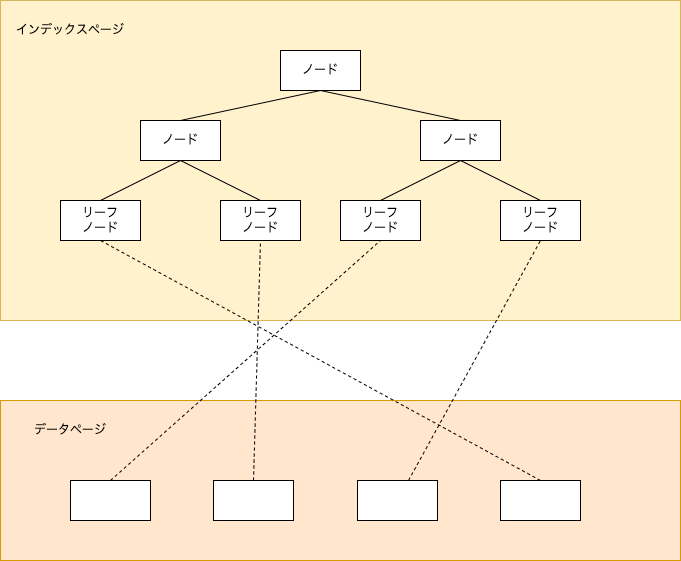
You need storage separately from the data pages, so it matters to set the right indexes in the right number.
What happens when an index is not used
If you search sales data that does not have an index yet, the execution plan looks like the following. (If a primary key exists, a clustered index is created, so this screenshot is from a search with the primary key removed.)
select *
from blog.sales
where transaction_date = '2022-01-01'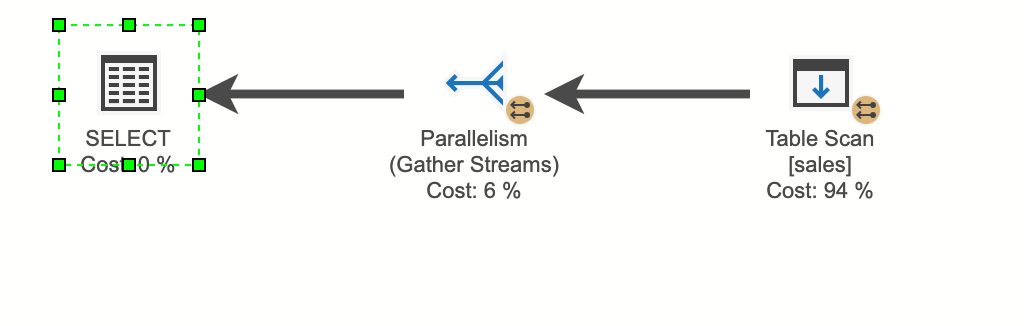
“Table Scan” means the entire table is being read. Even with a transaction-date predicate, SQL Server has no way to know where which transaction-date rows live, so it has to read the whole table. Even if you search with a condition that uniquely identifies a row, without an index SQL Server cannot know that it is unique, so it still reads everything and then returns the data. Scan is the slowest operation, so except for small master data and similar cases, you want to tune indexes so you do not get a Scan.
Notes
Data you have searched once can be cached, and the second and later runs can become faster. When you test, I recommend clearing the cache as you go.
DBCC DROPCLEANBUFFERS
DBCC FREEPROCCACHE
Index types
There are two broad kinds of index: clustered indexes and nonclustered indexes. Their characteristics differ, as explained below.
Clustered index
You can create only one per table, and it is the index that realizes the fastest search. Data pages live in the leaf nodes, so you do not need to go from index pages to data pages; walking the index pages is enough to get the data. Rows are physically ordered in the key order of the index, so you can create only one per table.
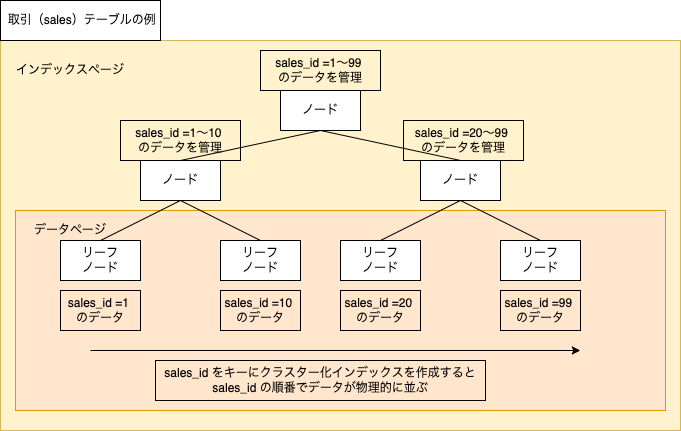
To create a clustered index, create a primary key, or create the index with DDL as below (on Windows you can also create it from a GUI in the tools).
CREATE CLUSTERED INDEX clustered_index ON blog.sales (sales_id);Even with 50 million rows, a search on the clustered-index key can return data instantly. When the clustered index is being used, the display is “Clustered Index Seek.” Seek is the evidence that the index is being used.
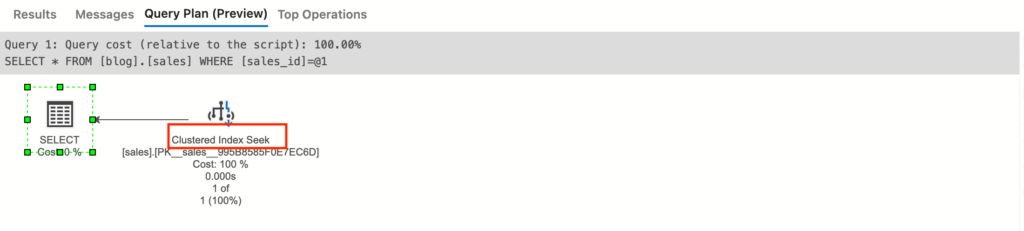
If you search on something other than the clustered-index key, you can get a Scan. On a table that has a clustered index, it is not shown as “Table Scan” but as “Clsutered Index Scan.” At a glance it can look as if the index is being used, but it is almost the same as a “Table Scan” and is a slow search.
select *
from blog.sales
where transaction_date = '2022-01-01'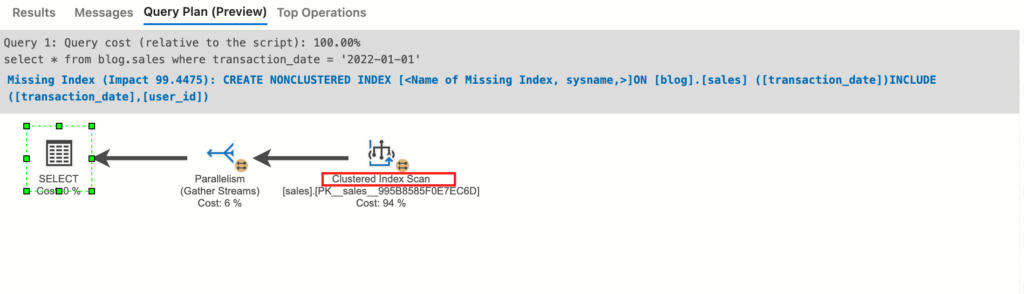
Put together, the characteristics are as follows.
- Fastest search
- You can create only one per table
- Data is physically ordered by the key
- Data lives in the leaf nodes (no Lookup)
- The key set on the primary key becomes the clustered-index key
- Scan with no clustered index: Table Scan
- Scan with a clustered index: Clustered Index Scan
Nonclustered index
An index you can create more than one of on a table. After walking the index pages, it accesses data pages to get the data. This is the index you will tune most often.
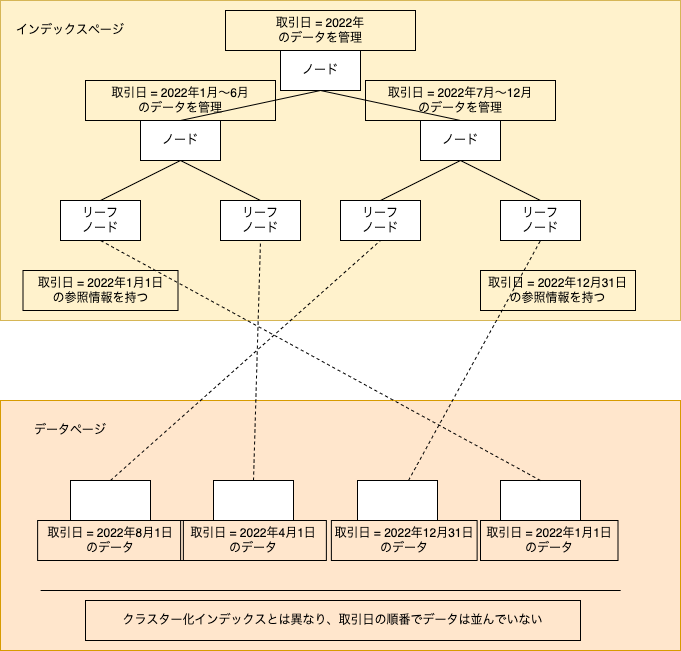
DDL to create an index on the status column of the sales table looks like the following. Even without NONCLUSTERED, it becomes a nonclustered index. (The earlier example used the transaction-date column, but the execution plan did not come out as expected, so I will explain with the status column.)
CREATE INDEX IX_sales_01 ON blog.sales(status);
-- または、
CREATE NONCLUSTERED INDEX IX_sales_01 ON blog.sales(status);
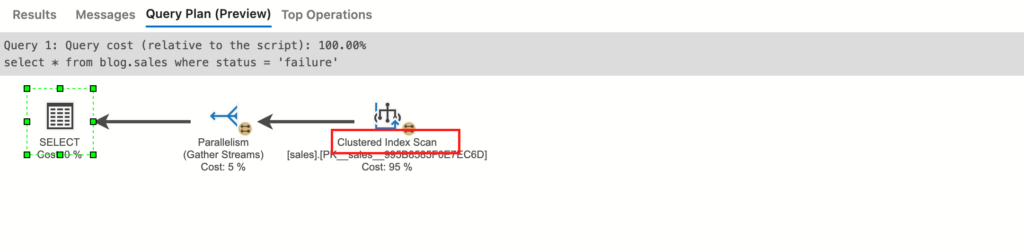
Compare a search on the status column before and after creating the index.
select *
from blog.sales
where status = 'failure'
Before creating the index
After creating the index
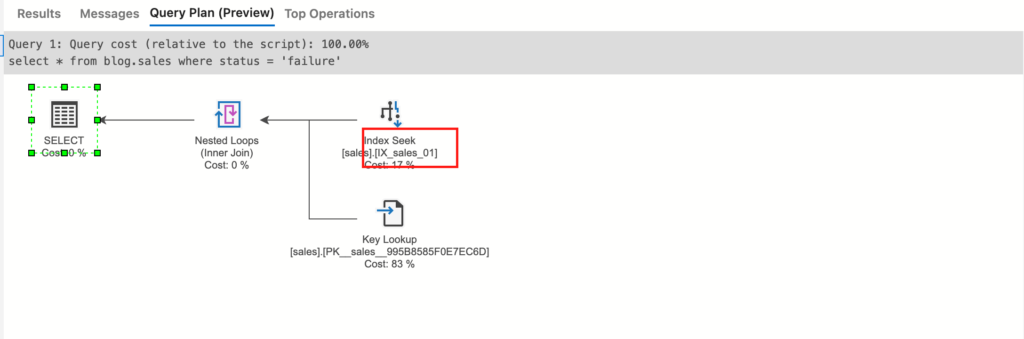
After creating the index it becomes “Index Seek,” so you can see the index is being used. There is also “Key Lookup,” so after walking the index pages it is accessing data pages.
How Lookup works differs depending on whether the table has a clustered index. With no clustered index it is a RID Lookup (pointer lookup): the leaf node holds a pointer to the data page, and the engine goes there for the data. With a clustered index it is a Key Lookup: the leaf node holds the clustered-index key, and the engine goes to the data page for the data.
That said, this Lookup is surprisingly expensive, and even when the index is being used you can get less performance than you expected (in the screenshot, Index Seek is 17% / Key Lookup is 83%, which also shows that the cost of accessing data pages is high). What helps in that case is the included-column index described next.
When Lookup keeps performance from coming out, consider an included-column index.
Summary of nonclustered indexes
- You can create only one per table
- After walking the index pages, it reads data pages
- Lookup with no clustered index: RID Lookup (pointer lookup)
- Lookup with a clustered index: Key Lookup
Included-column index
An extended form of the nonclustered index, useful when you SELECT specific columns. Internally, it stores those columns’ data in the leaf nodes of the index pages. Index pages normally hold only the key columns; this is a way to also hold the columns you want to SELECT, so the data is stored twice.
When you fetch every column with * (a regular nonclustered index)
select *
from blog.sales
where status = 'failure'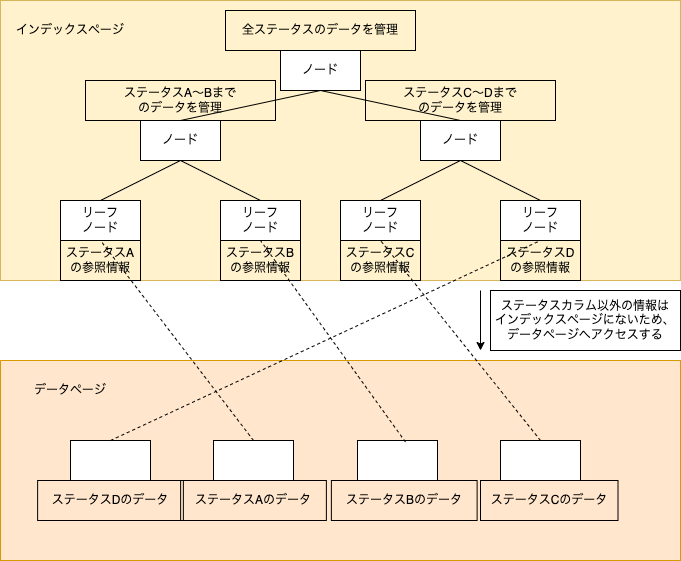
The example above was a search that fetched every column. Assume you only need status, sales ID, and user ID. In that case, if you put sales ID and user ID in the included columns (the INCLUDE clause), you can get the data without a Lookup.
DDL for an included-column index looks like this.
CREATE INDEX IX_sales_02 ON blog.sales(status) INCLUDE(sales_id,user_id);Every node has information for the key column specified in the ON clause (here, status). Only the leaf nodes get the extra columns (here, sales ID / user ID). By holding that data twice — in the index and on the data pages — you get a fast search without a Lookup.
The trick is that you do not put those columns on every node, only on the leaf nodes. Putting the needed columns on every node (specifying the columns in the ON clause) is called a covering index. That is faster than an included-column index, but it needs more storage, so the downside is larger. An included-column index keeps the search fast while using less storage than a covering index.
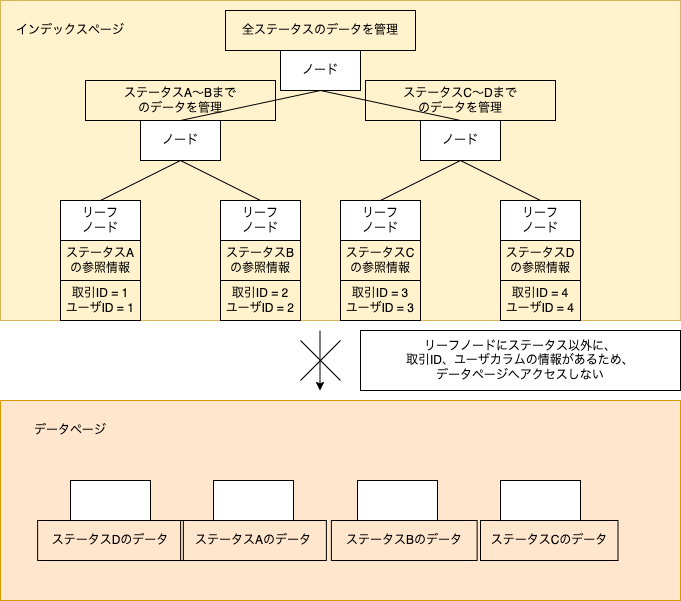
If you run a query that SELECTs only specific columns,
select sales_id,user_id,status
from blog.sales
where status = 'failure'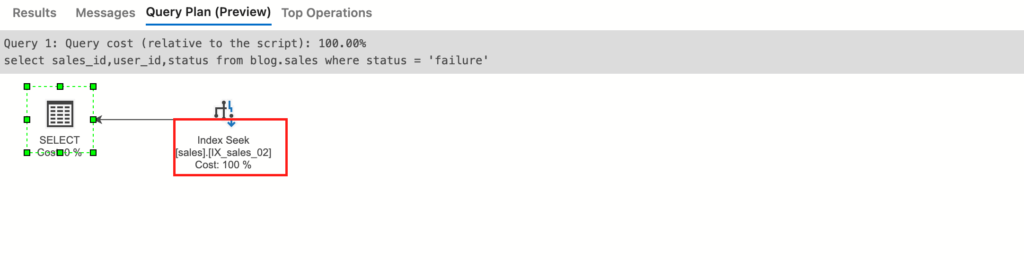
“Key Lookup” is gone and the plan is “Index Seek” only, so you can see there is no access to data pages.
However, as noted above, an included-column index holds the data twice — in the index and on the data pages — so write-type work becomes even slower. Do not INCLUDE columns casually; pick the minimum you need. Also, if you SELECT even one column that is not in INCLUDE, you get a Lookup.
Summary of included-column indexes
- An extended form of the nonclustered index
- Only the leaf nodes hold the included (INCLUDE) data
- When you read only the included columns, there is no data-page access, so it is fast
Takeaways
Once you have the internals of SQL Server and the basic way to read an execution plan, it matters to pick the index that fits the use. You can create only one clustered index, so rather than setting a primary key casually, you want to set it on a practical key. Also, the more indexes you create, the slower write-type work becomes, so creating the right indexes in the right number is something you have to consider when tuning.
I also wrote about what I changed when improving a batch process that used SQL Server. Please take a look.