These are my notes on A Thorough Guide to Database Design (達人に学ぶDB設計 徹底指南書), plus some stories from work and extra research of my own.
A Thorough Guide to Database Design
Logical design and physical design
Physical placement of files
A database is not a single file. It is built from several kinds of files. The exact makeup differs by database, but you should know these conceptual file types exist.
- Data files
- Index files
- System files
- Temporary files
- Log files
Temporary files (temporary tables) hold short-lived data when a subquery is expanded or when you use GROUP BY or DISTINCT. That data is not persisted. I have seen this at work: on a query with many joins, explicitly using a temporary table at an intermediate step and SELECTing only the columns you need can free memory and improve performance.
Log files store the changes made to the database and are used for rollback and restore. When the database accepts a change, it does not change the data immediately. It writes to the log file first, then updates the data.
Backup design
There are three main kinds of data backups.
- Full backup
- Differential backup
- Incremental backup
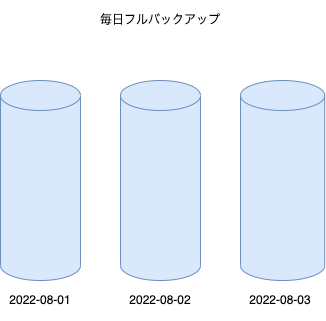
Full backup
A method that backs up all data every time. Operations are simple because you only need the backup from the point you want to restore, but the performance and cost downsides are large.
Advantages
- Operations become very simple.
Disadvantages
- Backup time is long.
- It consumes a lot of storage.
- You may need to stop the service.
Differential backup
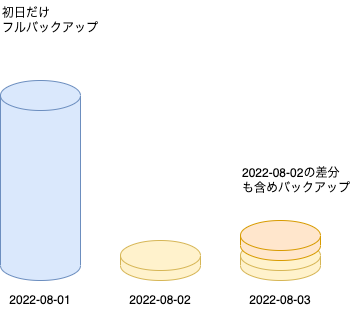
A method that takes a full backup only on the first day of the cycle, then backs up everything since that first day (including the previous day’s changes). Compared with a full backup every day, it uses less storage, but restore steps increase a bit. To restore the data for 2022-08-03 in the example, you need the 2022-08-03 file and the 2022-08-03 file.
Advantages (compared with a full backup)
- Backup time is shorter.
- It consumes less storage.
Disadvantages (compared with a full backup)
- You need two files when you restore.
Incremental backup
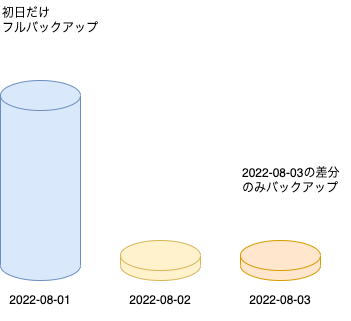
A further extension of differential backup. It backs up only that day’s changes, without including the previous day. To restore the data for 2022-08-03 in the example, you need the 2022-08-01, 2022-08-02, and 2022-08-03 files.
Advantages (compared with a differential backup)
- Backup time is shorter.
- It consumes less storage.
Disadvantages (compared with a differential backup)
- You need quite a few files when you restore (one per day, and so on).
So the cost of taking backups and the cost of recovery are clearly a trade-off. You need to decide based on business requirements: how much time you can spend creating backups, and how much time you can spend restoring. In general, differential or incremental backups seem more common. You also need to roll forward from the log file if you must restore that day’s updates as well.
If you use a cloud database, you may not need to think about this as much. Managed services are more common now, and restoring an arbitrary point in time is often easy from the cloud portal.
Logical design and normalization
Table naming conventions
A table is a set of data that shares something in common, so the table name should be a plural or a name that can be read as a plural noun. After you pick a name, look back once and check whether it is appropriate.
Keys
I do not think about these much day to day, but here are notes on candidate keys and superkeys.
Candidate key
A column (or combination of columns) that uniquely identifies a row. A table can have more than one, and the primary key is chosen from them.
Superkey
A column combination you get by adding non-key columns to a candidate key. There are more superkeys than candidate keys.
Constraints
I use NOT NULL and uniqueness constraints often, but I had not used check constraints, so here is a note.
Check constraint
A constraint that checks values, as the name says. In SQL Server you can add a constraint to a column as follows. INSERT or UPDATE statements that fail the check raise an error.
ALTER TABLE <スキーマ名>.<テーブル名>
   ADD <カラム名> int NULL
   CONSTRAINT <チェック名>
   CHECK (<カラム> > 100 AND <カラム> < 1000); -- チェック内容は例
GO
Higher normal forms
Third normal form is usually enough, but there are higher normal forms. I will skip the details; it is enough to know the concepts exist.
- Boyce–Codd normal form
- Fourth normal form
- Fifth normal form
Should you always normalize?
In principle you should go to third normal form and remove redundancy. On a product I worked on, though, we built data by denormalizing master data as of the ingest snapshot. That was both for performance and because the spec required recording the master as of that snapshot. The default should still be to normalize, but denormalization as a last resort is also a valid option.
ER diagrams
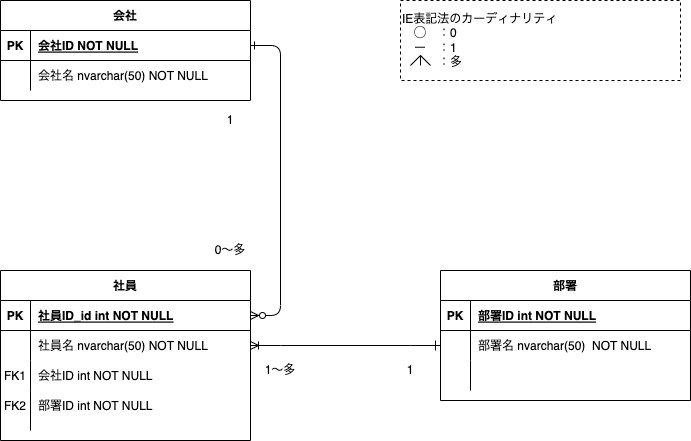
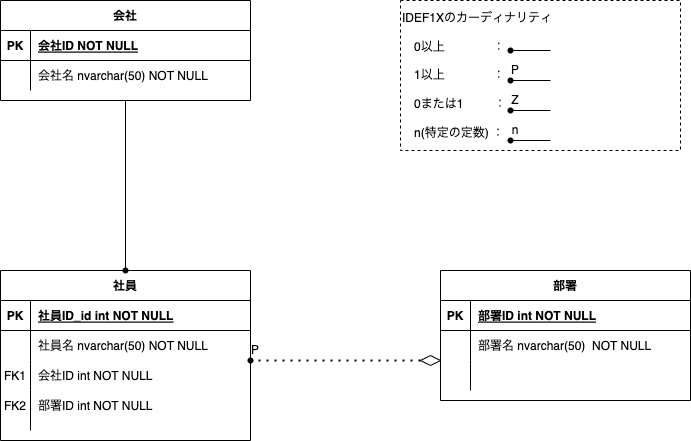
This is not something I strictly need to write down, but I forget how to read them now and then, so this is a reminder. Cardinality is a word I want to keep.
Cardinality
On an ER diagram, it is the multiplicity between entities.
On a table, it is how many distinct values a column contains. High cardinality means many distinct values. Low cardinality means few.
ER diagrams are easy to generate from the DB client A5M2, or to draw in diagrams.net. I used diagrams.net this time.
IE notation
IDEF1X
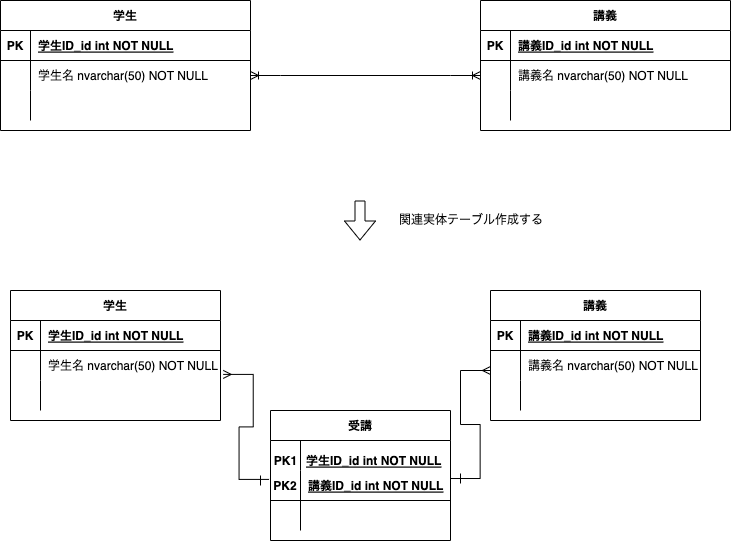
Many-to-many tables
For tables in a many-to-many relationship like the following, you can resolve the many-to-many by creating an association table (associative entity) whose composite key is the two IDs.
Performance
Indexes
Application transparency and data transparency are words I want to keep, so I will explain them.
Application-transparent
The application does not have to think about it. Which index to use is basically left to the DBMS.
Data-transparent
Creating an index does not affect the data.
The main index types are as follows.
- B-tree index
- Bitmap index
- Hash index
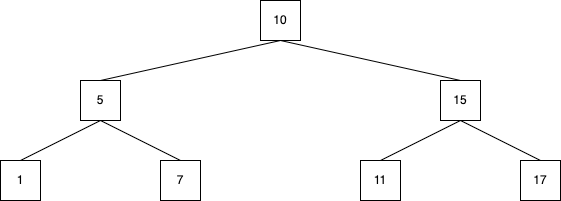
You mainly need to understand B-tree indexes. In short, they are well balanced.
- Because it is a balanced tree, the cost is the same for any value
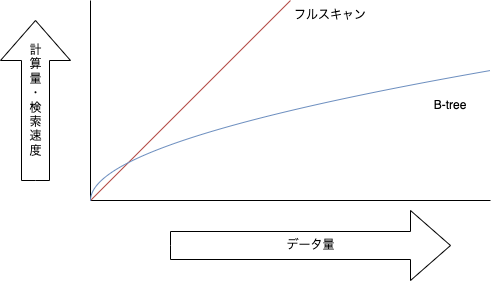
- Search time grows slowly even as the data gets large
- Insert, update, and delete cost about as much as a search
- Inequality and range searches are supported
- Implicit sorting
Because it is a balanced tree, the cost is the same for any value
Image of a B-tree index
Search time grows slowly even as the data gets large
Image of computational complexity
Implicit sorting
The following operations sort implicitly.
- Aggregate functions
- Set operators
- OLAP functions
- ORDER BY
You should create an index when the following apply.
- Large tables
- High-cardinality columns
- Columns used as search conditions or join conditions
Create them on high-cardinality columns
The higher the cardinality, the more a condition can filter rows, and the more effective the index. A condition that reduces rows to 1/3 is less useful than one that reduces them to 1/30. Even with high cardinality, if rows pile up on a particular value, the filter does not work and the index may not help.
Indexes do not work well in scenes like these.
- Expressions or functions on the indexed column
- Searching with IS NULL
- Negation (NOT conditions)
- OR conditions (you should use IN)
- Suffix or infix fuzzy search (prefix match is OK)
- Implicit type conversion
Another caution is fragmentation. Inserts and updates can make the internal layout less efficient and hurt performance. On a product I worked on, we periodically rebuilt indexes to clear fragmentation.
This is about a specific DBMS, but I have a post on SQL Server indexes. Please read it. SQL Server indexes are also B-tree indexes.
[SQL Server] Indexes and execution plans
Statistics
Summary information about tables, indexes, and so on. The DBMS optimizer reads statistics and chooses an execution plan. If the statistics drift from the actual table, an appropriate plan may not be chosen. You need measures such as enabling automatic updates.
Antipatterns
The book also covers quite basic material. The theme across the board is that you should not raise the level of abstraction too far.
Non-scalar values
With array types and similar, you can put multiple values in one column. That is not even first normal form. It undermines the point of an RDB, so you should avoid it completely.
| Student ID | Name | Family names |
|---|---|---|
| 1 | Jiro Sato | Saburo |
| 2 | Taro Tanaka | Kosuke |
| Shiro | ||
| 3 | Kohei Takahashi | Kenji |
| Koji | ||
| Taishi |
Double meaning
A column is not a variable, so one column should not mean two things. In a table like the following, if the fourth column stores remaining credits only when the student is a fourth-year, you should add a column for remaining credits.
| Student ID | Name | Year | Credits earned? Remaining credits? |
|---|---|---|---|
| 1 | Jiro Sato | 1 | 100 |
| 2 | Taro Tanaka | 2 | 80 |
| 3 | Kohei Takahashi | 4 | 10 |
Single reference table
Merging two tables that have a similar meaning and shape into one can add so many rows that performance drops, and the meaning of the table can blur.
| Student ID | Name | Selection |
|---|---|---|
| 1 | Jiro Sato | 19 |
| 2 | Taro Tanaka | 20 |
| 3 | Kohei Takahashi | 22 |
| Professor ID | Name | Age |
|---|---|---|
| 101 | Kazuo Iida | 43 |
| 102 | Yohei Sasaki | 50 |
| 103 | Junpei Yoshida | 39 |
Merged into ↓
| ID | Name | Age |
|---|---|---|
| 1 | Jiro Sato | 19 |
| 2 | Taro Tanaka | 20 |
| 3 | Kohei Takahashi | 22 |
| 101 | Kazuo Iida | 43 |
| 102 | Yohei Sasaki | 50 |
| 103 | Junpei Yoshida | 39 |
If you do merge them this way, you need something like a type column.
Table splitting
Horizontal splitting means splitting a table by rows.
| ID | Name | Age |
|---|---|---|
| 1 | Jiro Sato | 19 |
| 2 | Taro Tanaka | 20 |
| 3 | Kohei Takahashi | 22 |
| 4 | Yohei Higashitani | 22 |
| 5 | Shuichi Sakamoto | 21 |
| 6 | Yuta Ito | 22 |
Split by ID ↓
| Student ID | Name | Age |
|---|---|---|
| 1 | Jiro Sato | 19 |
| 2 | Taro Tanaka | 20 |
| 3 | Kohei Takahashi | 22 |
| Student ID | Name | Age |
|---|---|---|
| 4 | Yohei Higashitani | 22 |
| 5 | Shuichi Sakamoto | 21 |
| 6 | Yuta Ito | 22 |
Changing which table you hit based on ID is painful and raises operational cost. Partitioning can split the files physically and improve performance. The application still sees one table, so you keep application transparency.
Vertical splitting splits by columns rather than rows. It is also done with performance in mind, but like vertical splitting, it raises operational cost.
Inappropriate keys
Keys with the same meaning should use the same type even across tables. Foreign keys are used in joins a lot, so types matter. If the types differ, the join may implicitly convert types and get slower.
Takeaways
Beyond what this post covers, the book also explains gray-area know-how and more advanced design. There are exercises too. If you read it before you work with databases, some of it may not click. After you have done real DB work, reading it again often deepens understanding a lot. It covers many viewpoints, has plenty of diagrams, and is easy to follow. I recommend it.
I also wrote about batch performance work on SQL Server. Please read that too.