
This post covers the BCP command, which can bulk-import large datasets into SQL Server. If you are building a performance-test environment, it is worth a look. Export is also possible, but this article is about import only.
Install
The installer also brings in other SQL Server tools such as sqlcmd, not just BCP.
Windows
Download the installer and run it.
Mac
Run the commands from the official page.
	brew tap microsoft/mssql-release https://github.com/Microsoft/homebrew-mssql-release
	brew update
	brew install mssql-tools
Usage
Assumptions
The walkthrough uses this table.
-- ---------------------
-- Sales
-- ---------------------
CREATE TABLE blog.sales (
    sales_id INT NOT NULL
    , amount INT NOT NULL
    , transaction_date DATE NOT NULL
    , status VARCHAR(20) NOT NULL
    , cancel_flg BIT
    , shop_id INT NOT NULL
    , user_id INT NOT NULL
    , PRIMARY KEY(sales_id)
    , FOREIGN KEY(user_id) REFERENCES blog.my_user(user_id) -- assumes a user table exists
    , FOREIGN KEY(shop_id) REFERENCES blog.shop(shop_id) -- assumes a shop table exists
)
sales_id is column 1 through user_id as column 7.
Basic operation
You pass the database connection, the target table, and the data file.
bcp [schema_name].[table_name] in [data_file] -S [db_server] -d [db_name] -U [username] -P [password]In the rest of this article I keep the connection details redacted.
A data file for the sample sales table looks like this. The default delimiter is a tab. Each value is imported in table-column order.
50000001	8752	2022-06-08	success	0	9774	1425
50000002	5246	2022-01-03	success	0	6885	15022
50000003	3066	2022-11-06	success	0	6914	14836
50000004	3029	2022-08-14	success	0	2119	608
50000005	8156	2022-04-04	success	0	9430	16418
50000006	1003	2022-05-22	success	0	7512	13800
50000007	5420	2022-05-21	success	0	1034	12179
50000008	2814	2022-08-13	success	0	3851	27799
50000009	7812	2022-04-26	success	0	4517	185
50000010	3163	2022-11-24	success	0	6424	23914
The BCP command looks like this. Options are explained later.
bcp blog.sales in sales.tsv -S [db_server] -d [db_name] -U [username] -P [password] -q -E -k -e err.logWhen you specify a format file
The basic form is for loading every column. If you want to include or skip specific columns, or the file column order differs from the table, a format file helps.
Suppose column 5, cancel_flg, must never be loaded. The data file then has no cancel_flg values — six columns only.
50000001	8752	2022-06-08	success	9774	1425
50000002	5246	2022-01-03	success	6885	15022
50000003	3066	2022-11-06	success	6914	14836
50000004	3029	2022-08-14	success	2119	608
50000005	8156	2022-04-04	success	9430	16418
50000006	1003	2022-05-22	success	7512	13800
50000007	5420	2022-05-21	success	1034	12179
50000008	2814	2022-08-13	success	3851	27799
50000009	7812	2022-04-26	success	4517	185
50000010	3163	2022-11-24	success	6424	23914
Define the format file like this.
14.0
6
1       SQLCHAR             0       12      "\t"   1     sales_id                                                             ""
2       SQLCHAR             0       12      "\t"   2     amount                                                               ""
3       SQLCHAR             0       11      "\t"   3     transaction_date                                                     ""
4       SQLCHAR             0       20      "\t"   4     status                                                               SQL_Latin1_General_CP1_CI_AS
5       SQLCHAR             0       12      "\t"   6     shop_id                                                              ""
6       SQLCHAR             0       12      "\n"   7     user_id                                                              ""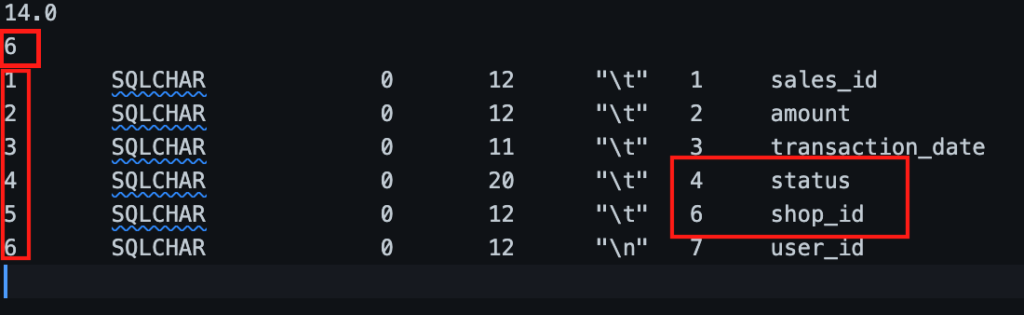
The 6 on the second line is how many columns you import. The table has 7 columns and we skip one, so it is 6. The 1–6 in the first column are the file column order. Columns 6 and 7 on the right are the table column order and names. We do not load cancel_flg (table column 5), so file column 5 is imported as table column 6, shop_id.
Watch these format-file rules:
- The delimiter on the last line (last column definition) must be a newline
- There must be a newline after the last line
How to create a format file
Writing that file by hand is painful. You can emit a format file from the real table:
bcp [schema_name].[table_name] format -f [format_file] -S [db_server] -d [db_name] -U [username] -P [password]The default is XML. To get a non-XML format, put nul after the table name. -c also skips the per-field type prompts. I create non-XML format files.
bcp blog.sales format nul -c -f sales.fmt -S [db_server] -d [db_name] -U [username] -P [password]It outputs every column, so you still have to edit the file down to the columns you need.
14.0
7
1       SQLCHAR             0       12      "\t"   1     sales_id                                                             ""
2       SQLCHAR             0       12      "\t"   2     amount                                                               ""
3       SQLCHAR             0       11      "\t"   3     transaction_date                                                     ""
4       SQLCHAR             0       20      "\t"   4     status                                                               SQL_Latin1_General_CP1_CI_AS
5       SQLCHAR             0       1       "\t"   5     cancel_flg                                                           ""
6       SQLCHAR             0       12      "\t"   6     shop_id                                                              ""
7       SQLCHAR             0       12      "\n"   7     user_id                                                              ""
Options I use often
| Option | What it does |
|---|---|
| -E | Use explicit values for identity columns. Without this, a table with auto-increment uses values assigned by the database instead of the file. |
| -q | Use when the database name contains spaces or single quotes. |
| -b | Commit in batches of the given size. For very large loads, smaller commits lower the cost of a retry after a mid-run error. |
| -f | Specify a format file. |
| -t | Specify the delimiter. The default is tab (\t). |
| -k | Keep NULLs. Empty fields in the data file become NULL. |
| -e | Specify an error log file. |
| -F | Start row in the file. Default is 1. Use 2 to skip a header. |
| -L | Last row in the file. Must be greater than 0 and no more than the file row count. To process the first 100 of 1000 rows, use -L 100. |
| -c | When creating a format file, skip the per-field type prompts. |
Common error messages
| SQLState NativeError | Error message (variable parts included) | Cause |
|---|---|---|
| 22005 0 | Invalid character value for cast specification | The value does not match the column type — a date like 2022-0801 instead of 2022-08-01. The data file has more columns than the format file. The last format-file column delimiter is not a newline. |
| 23000 2627 | Violation of PRIMARY KEY constraint ‘PK__shop__AD08178667B614A6’. Cannot insert duplicate key in object ‘blog.shop’. The duplicate key value is (1000001). | Duplicate primary key. |
| 23000 515 | Cannot insert the value NULL into column ‘sales_id’, table ‘develop.blog.sales’; column does not allow nulls. INSERT fails. | NULL is not allowed. |
| S1000 0 | I/O error while reading BCP format file | No newline after the last line of the format file. |
| S1000 0 | Unexpected EOF encountered in BCP data-file | The data file has fewer columns than the format file. |
| S1002 0 | Invalid Descriptor Index | The format file shape is invalid. |
Caveats
If the database is on a remote host such as Azure and you run BCP from your laptop, it can take a very long time and saturate the network. My PC became almost unusable, and the load was also very slow. Run BCP on a server that can reach the database.
① Build the data locally
↓
② Compress it and copy it to the server
↓
③ Unpack it and run BCP on the server
Takeaways
Adjusting a format file is tedious, but once it is in place you can import large datasets efficiently. It is useful not only for performance-test environments, but also for data migration and batch jobs that receive large files.
I also wrote about SQL Server indexes and about what mattered when I tuned performance. Those are worth reading next.
【SQL Server】 Indexes and execution plans
【SQL Server】 What actually mattered when I tuned performance