How far concurrent transactions may see each other’s updates — that is the isolation level. The same SELECT can return different results depending on the level. MySQL’s default is Repeatable Read.
We’ll run this on a local MySQL and check the four levels, plus the read problems that can happen at each.
Terms
Isolation level
A setting that decides how far a running transaction may read updates from other transactions. You can switch it per session.
Dirty Read
Reading a change another transaction has not committed yet. If that transaction later rolls back, what you read no longer matches the real data.
Non-repeatable Read
Reading the same row again inside the same transaction, and the value changing because another transaction committed an update.
Phantom Read
Re-running a query inside the same transaction, and the set of rows changing because another transaction inserted or deleted rows. The focus is rows appearing or disappearing, not updates.
MVCC
A mechanism that reads a snapshot. Inserts and deletes are also seen from the snapshot side, so a phantom read may not appear.
Isolation levels
We’ll confirm each level’s behavior by actually running it on MySQL. Commands you will use often:
-- 分離レベルの確認
select @@transaction_isolation;
-- 分離レベルの設定(セッション単位)
set session transaction isolation level <分離レベル>;
-- トランザクションの開始
start transaction;
begin;
-- コミット
commit;
-- ロールバック
rollback;
For setting details, see MySQL SET TRANSACTION.
Read Uncommitted
The lowest isolation level. One transaction can read data another transaction has not committed yet.
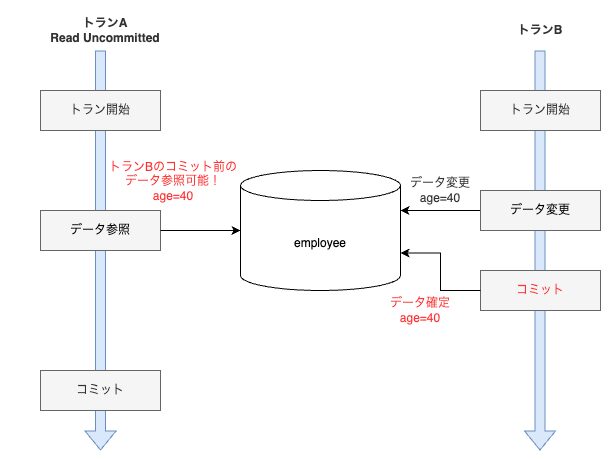
Figure: Right after Tran B updates age=40, Tran A can already see 40, even before the commit.
Set Tran A’s session to Read Uncommitted.
-- 分離レベルの設定: Read Uncommitted
set session transaction isolation level read uncommitted;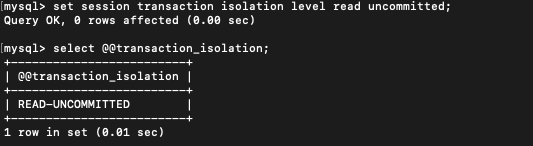
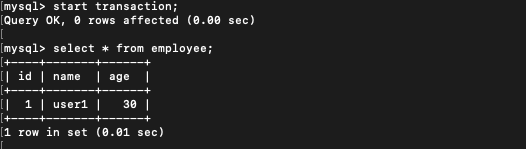
Start a transaction on Tran A and read user1’s age: it is 30.
Next, start a transaction on Tran B and update age to 40. Do not commit yet.

If Tran A reads again in this state, Tran B’s uncommitted update is visible (age=40).
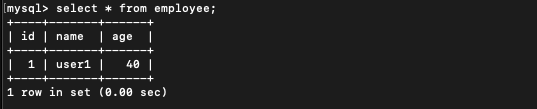
Read Committed
A widely adopted isolation level. A transaction can read only data that other transactions have committed.
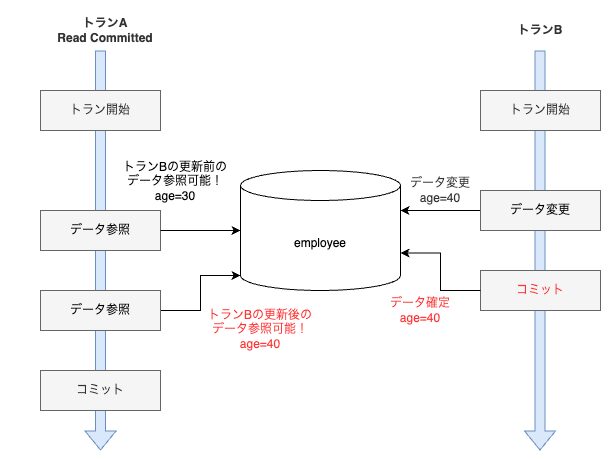
Figure: Tran B’s update is visible to Tran A only after the commit. The same SELECT changes age from 30 to 40 around the commit.
The main databases whose default this is are Oracle, SQL Server, and PostgreSQL.
Set Tran A’s session to Read Committed.
-- 分離レベルの設定: Read Committed
set session transaction isolation level read committed;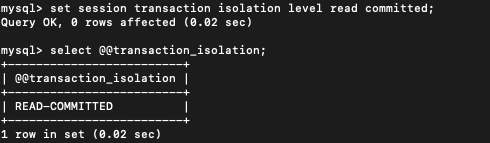
Start a transaction on Tran A and read user1’s age: it is 30.
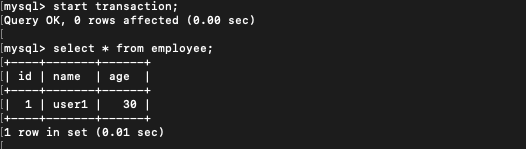
Next, start a transaction on Tran B and update age to 40. Still no commit.

If Tran A reads again in this state, the value is still what it was before Tran B’s update (age=30).
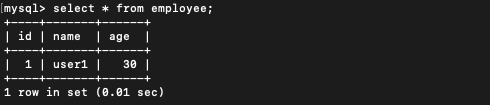
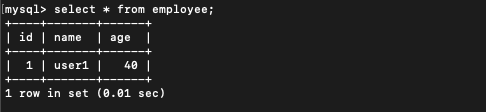
Commit Tran B.

If Tran A reads again in this state, Tran B’s now-committed update is visible (age=40).
Repeatable Read
A higher-consistency isolation level. A snapshot is taken at the start of the transaction, and until it ends, updates from other transactions are not visible.
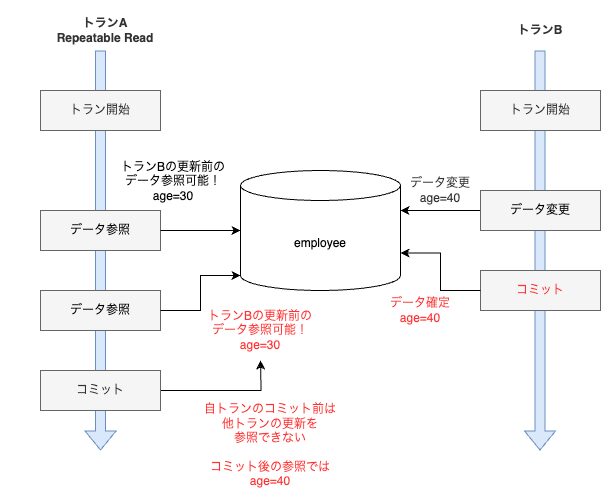
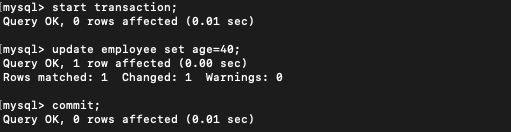
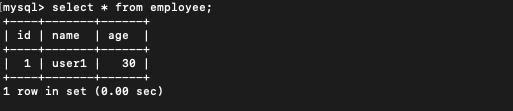
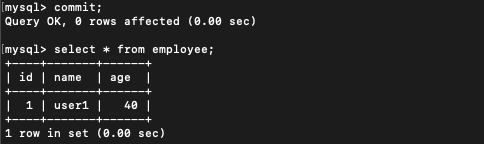
Figure: Even after Tran B commits age=40, Tran A still sees age=30 for the rest of its transaction. After Tran A commits, a read shows 40.
MySQL’s default is this Repeatable Read.
Set Tran A’s session to Repeatable Read.
-- 分離レベルの設定: Repeatable Read
set session transaction isolation level repeatable read;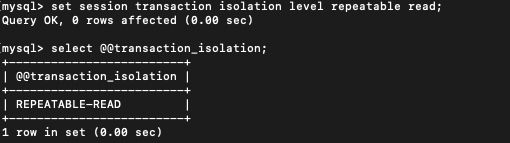
Start a transaction on Tran A and read user1’s age: it is 30.
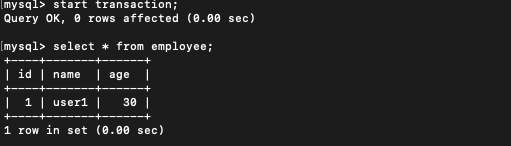
Next, start a transaction on Tran B, update age to 40, and commit.
If Tran A reads again in this state, Tran B’s update is still not visible. You can repeatedly read the pre-update age=30.
After Tran A commits, a read shows the post-update age=40.
Serializable
The isolation level that tries to guarantee the highest consistency. While one transaction is updating data, another transaction that tries to read that data may wait. Consistency is the highest, while concurrency drops and performance can be affected.
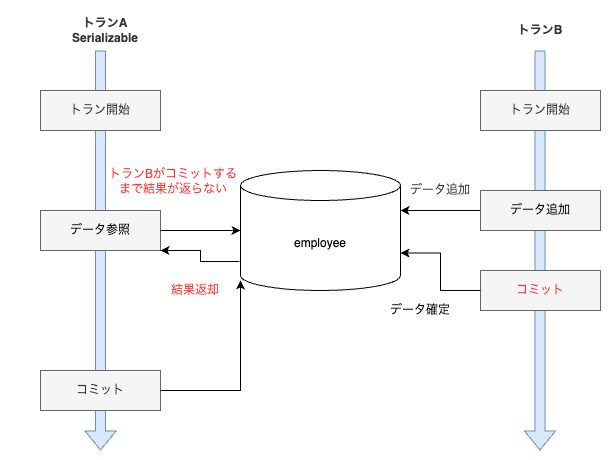
Figure: Tran A’s SELECT does not return a result until Tran B commits.
Set Tran A’s session to Serializable.
-- 分離レベルの設定: Serializable
set session transaction isolation level serializable;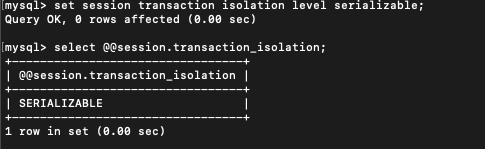
Start a transaction on Tran A.

Start a transaction on Tran B as well.

Insert data on Tran B.

Read the data on Tran A. It goes into a wait and the result does not come back right away.

Commit Tran B.

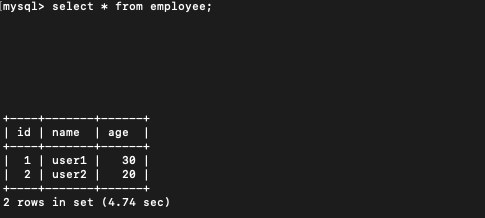
The result Tran A was waiting for comes back.
Isolation problems
Dirty reads, non-repeatable reads, and phantom reads are read problems that can occur at each isolation level. The lower the isolation level, the more likely they are.
| Problem | Levels where it can occur | What happens |
|---|---|---|
| Dirty read | Read Uncommitted | Uncommitted updates are visible |
| Non-repeatable read | Read Committed and below | Re-reading the same row changes the value |
| Phantom read | Repeatable Read and below | Inserts or deletes change the set of rows |
Dirty Read
If a Read Uncommitted transaction (Tran A) reads data, and another transaction (Tran B) then updates that data and rolls back, you get a mismatch. What Tran A read does not match the actual state.
In the next example, Tran A reads age=40. Tran B’s update is undone by rollback, so the real data is age=30.
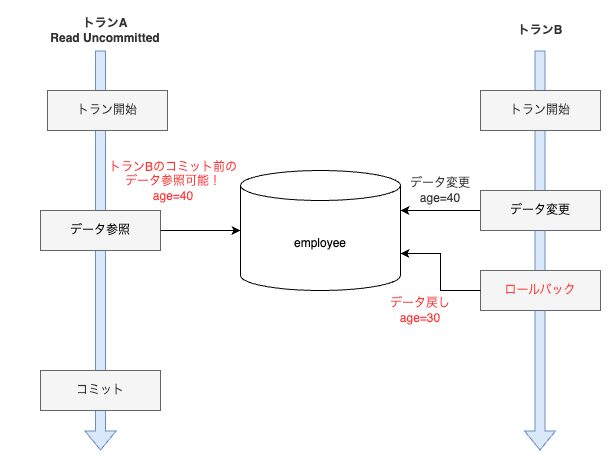
Figure: The age=40 Tran A read disappears when Tran B rolls back. The value that was read does not match the real data.
Non-repeatable Read
At Read Committed and below, reading the same data more than once inside the same transaction can produce a different result the second time. It happens when another transaction changes the data and commits. To prevent it, use Repeatable Read or Serializable.
That said, a non-repeatable read is not necessarily a problem. You can also see it as the isolation level behaving correctly. Many databases default to Read Committed, so this behavior can happen. In practice it is often acceptable; what matters is choosing a level that fits the database design and the application requirements.
Phantom Read
At Repeatable Read and below, if another transaction inserts or deletes rows while yours is running, a later query may pick up that change. The difference from a non-repeatable read is that the focus is inserts and deletes, not updates to existing rows.
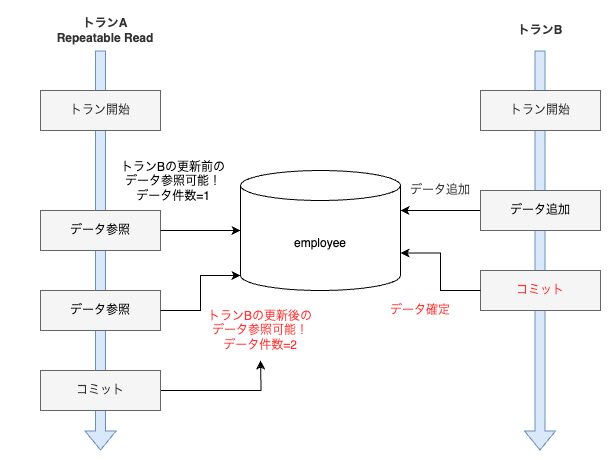
Figure: A phantom read as defined. A row is inserted in the middle, and the visible count changes.
Many articles write that “phantom reads occur at Repeatable Read.” It did not occur on my machine. With a snapshot-reading mechanism such as MVCC, inserts and deletes are also seen from the snapshot side. So phantom reads apparently do not appear.
Reference: Phantom reads and MySQL Repeatable Read
I tried to reproduce it on MySQL, and a phantom read did not occur.
-- ① トランAでトランザクションを開始
start transaction;
-- ② トランAでデータ参照(データ1件のみある)
select * from employee;
-- ③ トランBでトランザクションを開始
start transaction;
-- ④ トランBでデータ追加
insert into employee values(2,'user2',20);
-- ⑤ トランBでコミット
commit;
-- ⑥ トランAで再びデータ参照
select * from employee;
The expected value for a phantom read is that step ⑥ sees the row Tran B added in step ④. As a result, it was not visible. To see a reproduction, you would likely need Read Committed or below.
Takeaways
The isolation level decides how far concurrent transactions see each other’s updates. MySQL’s default is Repeatable Read.
Read Uncommitted can see even uncommitted updates, so it is almost never used in practice. At Read Committed, non-repeatable reads can occur, but that is also the behavior many databases adopt. Phantom reads are said to be possible at Repeatable Read and below. On MySQL, though, reads go to an MVCC snapshot, and I could not reproduce one locally.
The index-side write-up is in SQL Server indexes and execution plans.